


【备忘】Handsome主题修改记录


文章目录
[toc]
底部版权信息修改
去除内置的底部版权信息
- 文件路径:/handsome/component/footer.php
- 源代码
<div class="wrapper bg-light"> <span class="pull-right hidden-xs text-ellipsis"> <?php $this->options->BottomInfo(); // 可以去除主题版权信息,最好保留版权信息或者添加主题信息到友链,谢谢你的理解 ?> Powered by <a target="_blank" href="http://www.typecho.org">Typecho</a> | Theme by <a target="_blank" href="https://www.ihewro.com/archives/489/">handsome</a> </span> <span class="text-ellipsis">© <?php echo date("Y"); ?> Copyright <?php $this->options->BottomleftInfo(); ?></span> </div>- 修改为
<div class="wrapper bg-light"> <span class="pull-right hidden-xs text-ellipsis"> <?php $this->options->BottomInfo(); // 可以去除主题版权信息,最好保留版权信息或者添加主题信息到友链,谢谢你的理解 ?>
</span> <span class="text-ellipsis"> <?php $this->options->BottomleftInfo(); ?></span> </div>使用新的底部版权信息
- 后台设置-开发者设置-左侧信息
添加
Copyright © 2021-2022 <a href="https://kanochan.net" target="_blank" rel="noopener noreferrer">kanochan.net</a>- 后台设置-开发者设置-右侧信息
添加
<a href="https://kanochan.net/about.html">关于</a> ✦ <a href="mailto:helloworld@kanochan.net">Email联系我</a> ✦ <a href="http://typecho.org" rel= "noopener noreferrer" target= "_blank"> Typecho </a> ✦ <a href="https://www.ihewro.com/archives/489/" rel= "noopener noreferrer" target= "_blank">handsome </a>删除一些(个人认为)不必要的元素
删除文章标题旁边的阅读模式、改变字体大小选项
文件:/usr/themes/handsome/libs/Content.php
删除源代码:
if (!$isCustom) { $html .= '<a class="plus-font-size" data-toggle="tooltip" data-original-title="' . _mt("点击改变文章字体大小") . '"><i data-feather="type"></i></a>'; }if (!$isCustom) { $html .= '<a data-morphing style="vertical-align: -1px;" id="morphing" data-src="#morphing-content" href="javascript:;" class="read_mode superscript m-l-sm"data-toggle="tooltip" data-placement="right" data-original-title="' . _mt("阅读模式") . '"><i data-feather="book-open"></i></a>'; }删除动态页面中的”关于我“
- 文件路径:/handsome/cross.php
- 删除
<div class="panel box-shadow-wrap-normal"> <h4 class="font-thin padder"><?php _me("关于我") ?></h4> <ul class="list-group"> <li class="list-group-item"> <p><?php $this->options->about() ?></p>
</li> </ul> </div>删除文章顶部字数统计
- 文件路径:/handsome/post.php
- 删除源代码
<!--文字数目--><li class="meta-word"><span class="post-icons"><i data-feather="pen-tool"></i></span><span class="meta-value"><?php echo Utils::getWordsOfContentPost($this->text); ?><?php _me('字数'); ?></span></li>删除首页文章卡片的作者信息
- 文件路径:/handsome/libs/Content.php
- 删除源代码
<li><span class="m-r-sm right-small-icons"><i data-feather="user"></i></span><a href="{$parameterArray['authorUrl']}">{$parameterArray['author']}</a></li>删除首页右上角闲言碎语
- 文件路径:/handsome/component/headnav.php
- 删除源代码
<?php if (!$hideTalkItem): ?> <!--闲言碎语--> <li class="dropdown"> <a href="#" data-toggle="dropdown" class="feathericons dropdown-toggle"> <i data-feather="twitch"></i> <span class="visible-xs-inline"> <?php _me("闲言碎语") ?> </span> <span class="badge badge-sm up bg-danger pull-right-xs"><?php $read_id = Typecho_Cookie::get('user_read_id'); $latest_time_id = Typecho_Cookie::get('latest_time_id'); //$latest_time_id赋值应该在列表加载的后面// if (empty($latest_time_id)){// $latest_time_id = 999999;// } if (empty($read_id)){ $read_id = -1; } if (!empty($read_id) && !empty($latest_time_id)){ $not_read = $latest_time_id - $read_id; if ($not_read > 0){ _me("新"); } } ?></span> </a> <!-- dropdown --> <div class="dropdown-menu w-xl animated fadeInUp"> <div class="panel bg-white"> <div class="panel-heading b-light bg-light"> <strong> <?php _me("闲言碎语") ?> </strong> </div> <div class="list-group" id="smallRecording"> <?php $slug = "cross"; //页面缩略名 $limit = 3; //调用数量 $length = 140; //截取长度 $ispage = true; //true 输出slug页面评论,false输出其它所有评论 $isGuestbook = $ispage ? " = " : " <> ";
$db = $this->db; //Typecho_Db::get(); $options = $this->options; //Typecho_Widget::widget('Widget_Options');
$page = $db->fetchRow($db->select()->from('table.contents') ->where('table.contents.created < ?', $options->gmtTime) ->where('table.contents.slug = ?', $slug));
if ($page) { $type = $page['type']; $routeExists = (NULL != Typecho_Router::get($type)); $page['pathinfo'] = $routeExists ? Typecho_Router::url($type, $page) : '#'; $page['permalink'] = Typecho_Common::url($page['pathinfo'], $options->index);
$comments = $db->fetchAll($db->select()->from('table.comments') ->where('table.comments.status = ?', 'approved') ->where('table.comments.created < ?', $options->gmtTime) ->where('table.comments.type = ?', 'comment') ->where('table.comments.parent = ?', '0') ->where('table.comments.cid ' . $isGuestbook . ' ?', $page['cid']) ->order('table.comments.created', Typecho_Db::SORT_DESC) ->limit($limit)); $index = 0; foreach ($comments AS $comment) { if ($index == 0){ Typecho_Cookie::set('latest_time_id', $comment['coid']); } $index ++; $content = Content::postCommentContent(Markdown::convert($comment['text']),$this->user->hasLogin(),"","","",true); $content = Content::returnExceptShortCodeContent(trim(strip_tags($content))); if ($content == ""){ $content = _mt("点击查看详情"); }
echo '<a href="'.BLOG_URL_PHP.'cross.html" class="list-group-item"><span class="clear block m-b-none words_contents">'.Content::excerpt($content,200).'<br><small class="text-muted">'.Utils::formatDate($comments,$comment['created'], $this->options->commentDateFormat).'</small></span></a>'; } } else { echo '<a target="_blank" href="'.BLOG_URL.'admin/write-page.php" class="list-group-item"><span class="clear block m-b-none">这是一条默认的说说,如果你看到这条动态,请去后台新建独立页面,地址填写cross,自定义模板选择时光机。具体说明请参见主题的使用攻略。<br><small class="text-muted">'.date("F jS, Y \a\t h:i a",time()+($this->options->timezone - idate("Z"))).'</small></span></a>'; } ?> </div> </div> </div> </li> <!--/闲言碎语--> <?php endif; ?>将搜索框移到右侧
- 文件路径:/handsome/component/headnav.php
- 源代码
<form id="searchform1" class="searchform navbar-form navbar-form-sm navbar-left shift" method="post" role="search">- 修改为
<form id="searchform1" class="searchform navbar-form navbar-form-sm navbar-right shift" method="post" role="search">优化B站视频解析
- 后台设置-开发者设置-自定义CSS
添加
.bilivideo { position: relative; width: 100%;}
@media only screen and (max-width: 767px) { .bilivideo { height: 15em; }}
@media only screen and (min-width: 768px) and (max-width: 991px) { .bilivideo { height: 20em; }}
@media only screen and (min-width: 992px) and (max-width: 1199px) { .bilivideo { height: 30em; }}
@media only screen and (min-width: 1200px) { .bilivideo { height: 40em; }}
.iframe_cross { position: relative; width: 100%; height: 0; padding-bottom: 75%}
.iframe_cross iframe { position: absolute; width: 100%; height: 100%; left: 0; top: 0}- 调用方法
复制B站视频分享的嵌入代码,并添加CSS样式
示例如下
<iframe class="bilivideo" src="//player.bilibili.com/player.html?aid=380392634&bvid=BV1UZ4y1U73L&cid=478658742&page=1" scrolling="no" border="0" frameborder="no" framespacing="0" allowfullscreen="true"> </iframe>修复打赏页面不可点击的BUG
- 后台设置-开发者设置-自定义CSS
添加
.topButton{top: unset;bottom: 135px;}.settings{top: unset;bottom: 46px;} #goToTop {color: #aaaaaa;background-color: #000000;}.modal-open #post-panel.gpu-speed{transform:none;}配置CDN静态文件加速
服务使用了使用jsDelivr加速Handsome主题的静态资源最新8.3.0
20220303更新:服务使用了cdn.xxhzm.cn免费的静态文件加速服务,需要联系站长添加白名单才可使用。
vditor静态资源加速
handsome的vditor静态资源使用的是jsdelivr的CDN,但是不久前,jsdelivr失去了中国大陆经营牌照,CDN节点全部转到了国外,速度大大降低。
配置文件:/usr/themes/handsome/libs/CDN.php
将
https://cdn.jsdelivr.net/npm/vditor@3.8.10替换为
https://jsd.sorkai.com/web/npm/vditor@3.8.10handsome静态资源加速
主题后台配置CDN,填入域名:
https://cdn.xxhzm.cn/handsome/8.3.0/配置Google Analytics
修改文件:/usr/themes/handsome/component/header.php
在<head>里面添加谷歌统计代码:
<!-- Global site tag (gtag.js) - Google Analytics --><script async src="https://www.googletagmanager.com/gtag/js?id=G-E36S08YB7L"></script><script> window.dataLayer = window.dataLayer || []; function gtag(){dataLayer.push(arguments);} gtag('js', new Date());
gtag('config', 'G-E36S08YB7L');</script>友链页面优化
修改的部分太多了,直接覆盖源码吧,文件路径:/usr/themes/handsome/links.php
<?php/*** 友情链接** @package custom*/if (!defined('__TYPECHO_ROOT_DIR__')) exit;$this->need('component/header.php');?><style type="text/css">
</style>
<!-- aside --> <?php $this->need('component/aside.php'); ?> <!-- / aside -->
<!-- <div id="content" class="app-content"> --> <a class="off-screen-toggle hide"></a> <main class="app-content-body <?php Content::returnPageAnimateClass($this); ?>"> <div class="hbox hbox-auto-xs hbox-auto-sm"> <div class="col center-part" id="post-panel"> <div class="bg-light lter wrapper-md"> <h1 class="entry-title m-n font-thin text-black l-h"><span class="title-icons"><i data-feather="link"></i></span><?php _me ("海内存知己,天涯若比邻") ?></h1> <?php if (trim($this->fields->intro) !== ""): ?> <div class="entry-meta text-muted m-b-none small post-head-icon"><?php echo $this->fields->intro; ?></div> <?php endif ?> </div> <div class="wrapper-md"> <div class="tab-container post_tab"> <div class="tab-content"> <!-- list --> <div id="my-info" class="tab-pane fade in active"> <?php echo Content::returnLinkList("ten","tab_4"); ?> <div class="wrapper ng-binding" id="post-content"> <?php Content::postContentHtml($this,$this->user->hasLogin()); ?> </div> <!--评论--> <div class="bg-white wrapper border-radius-6"> <?php $this->need('component/comments.php') ?> </div> </div> </div> </div> </div> </div> <!--首页右侧栏--> <?php $this->need('component/sidebar.php') ?> </div> <!-- /content --></main> <!-- footer --> <?php $this->need('component/footer.php'); ?> <!-- / footer -->适配Chevereto上传插件
修改文件:/usr/themes/handsome/libs/Content.php第2324行
将
echo '<textarea id="handsome_md_text" class="hide" >' . htmlspecialchars($content) . '</textarea>';修改为
echo '<div id="handsome_md_text" class="hide" >' . htmlspecialchars($content) . '</div>';统一动态和评论的图片样式
后台添加自定义CSS:
.comment-content-true img { max-width: 60%!important; border-radius: 6px}修改源码/usr/themes/handsome/libs/Content.php第2396行,将
<figure class="image-thumb" itemprop="associatedMedia" itemscope="" itemtype="http://schema.org/ImageObject">修改为:
<figure itemprop="associatedMedia" itemscope="" itemtype="http://schema.org/ImageObject">首页增加右侧边栏网站公告
文件:/usr/themes/handsome/component/sidebar.php第127行左右,在
<?php while ($tags->next()): ?> <a href="<?php $tags->permalink();?>" class="label badge" title="<?php $tags->name(); ?>" data-toggle="tooltip"><?php $tags->name(); ?></a> <?php endwhile; ?> <?php endif; ?> </div> </section>下方增加代码
<!--网站公告--> <section id="tag_cloud-2" class="widget widget_tag_cloud wrapper-md clear"> <h5 class="widget-title m-t-none text-md">网站公告</h5> <div class="tags l-h-2x"> <!--在这里写公告的内容--> </div> </section>网站公告内容
IPV6提示
在公告内容写入处写入以下内容
<p>● 本站已支持IPV6访问!</p>网站运行时间
在公告内容写入处写入以下内容
<p> ● Kano酱博客的第<span id="site_runtime" style="color: #24a0f0;"></span>天</p> <script type="text/javascript"> function show_site_runtime(){ X=new Date("2021-02-19"); //在这里修改你的建站时间 Y=new Date(); T=(Y.getTime()-X.getTime()); // 获取当前时间与指定时间之间的时间间隔(ms) i=24*60*60*1000; d=T/i; D=Math.floor(d); // 计算天数并向下取整 site_runtime.innerHTML= D } show_site_runtime(); </script>参考来源:Hexo 博客显示网站运行时间代码
手机端不在下方显示右侧边栏内容.
开发者选项自定义CSS加入
/*手机不显示热门及标签云*/@media (max-width:767px) { #tabs-4,#tag_cloud-2 { display: none; }}修改首页文章摘要日期显示格式
文件:/usr/themes/handsome/libs/Content.php第861行左右,将
if ($parameterArray['date'] != 0) { $dateString = date(I18n::dateFormat(), $parameterArray['date']); }修改为
if ($parameterArray['date'] != 0) { $dateString = date("y/n/j", $parameterArray['date']); }注意:这样修改会使主题对日期的翻译功能失效,不过日期的读法在全世界都是通用的,问题不大。
评论日期本土化处理
handsome的日期格式调用的是typecho的日期格式,只需要修改typecho的日期格式即可。
后台-`设置-评论-评论日期格式`
将默认的日期格式修改为:Y年m月d日 H:i:s,更多格式,请参照date
增加编辑器toc目录支持
注:本节的前提是,在handsome插件中启用vditor编辑器,并且前台使用vditor渲染。
插件设置
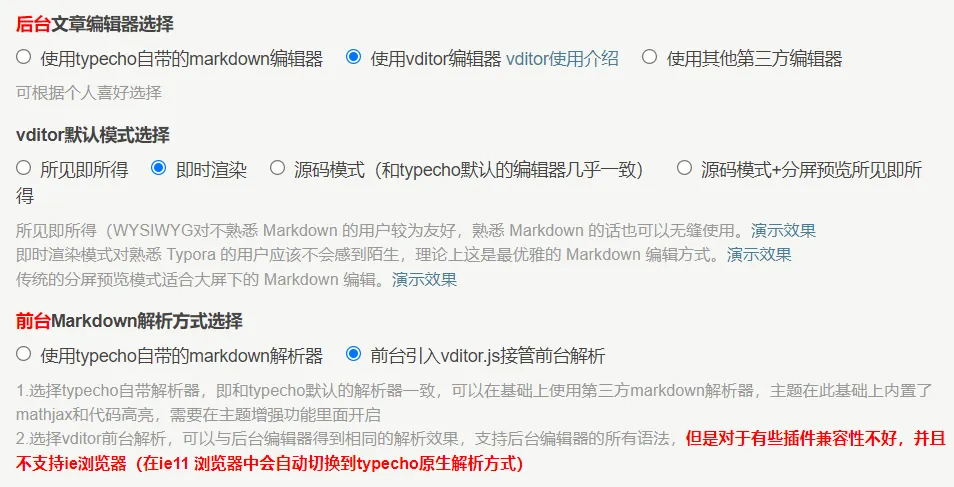
toc是markdown的扩展语法,在markdown文章的适当位置加入标记#[toc]#(实际使用中请把“#”去掉),即可将文章内的标题自动转换成目录的形式。toc目录分为两个方面,一个是后台渲染,一个是前台渲染,两者引入的文件不同,在vditor默认的配置中,toc目录功能是被关闭的。后台编辑器渲染引入的文件是index.min.js,前台渲染用的是method.min.js。vditor支持丰富的自定义设置,更多信息你可以在README.md上获得支持。
后台渲染toc目录支持
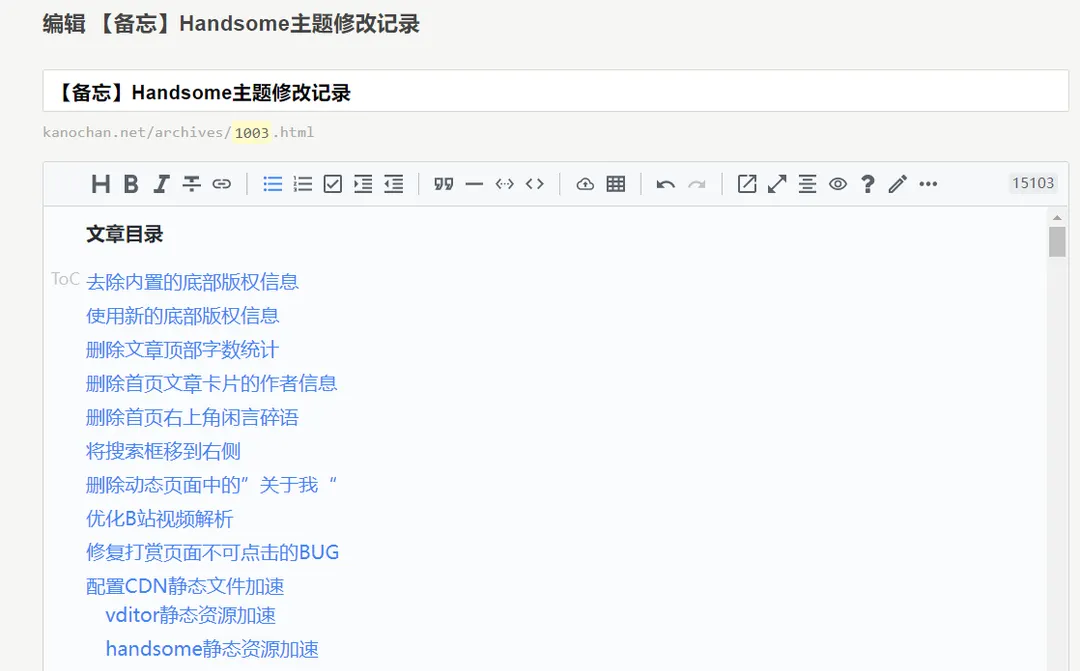
Handsome对vditor的一些自定义配置存储在/usr/plugins/Handsome/assets/js/origin/editor-js.php中,需要修改它以支持toc目录功能。
修改文件/usr/plugins/Handsome/assets/js/origin/editor-js.php第861行左右
原文:
preview: { icon: "material", hljs: { enable: true, style: 'monokai', lineNumber: true }, "math": { "engine": "MathJax", "macros": { "bf": "{\\boldsymbol f}", "bu": "{\\boldsymbol u}", "bv": "{\\boldsymbol v}", "bw": "{\\boldsymbol w}" }, "inlineDigit": true },修改为:
preview: { icon: "material", hljs: { enable: true, style: 'monokai', lineNumber: true }, markdown: { toc: true }, "math": { "engine": "MathJax", "macros": { "bf": "{\\boldsymbol f}", "bu": "{\\boldsymbol u}", "bv": "{\\boldsymbol v}", "bw": "{\\boldsymbol w}" }, "inlineDigit": true },即增加了一个自定义设置markdown: {toc: true},打开toc目录功能。
前台渲染toc目录支持
虽然一直想尽力避免对vditor源码的修改,就像前面的后台渲染一样,通过修改主题插件实现。但是对于前台渲染,由于不需要编辑功能,直接引入method.min.js即可。理论上,设置method.min.js功能的方法和设置index.min.js类似,但是由于能力有限(我太菜了),暂时只能通过修改vditor源码的方式实现,即修改method.min.js。所以,要想实现前台渲染支持toc目录的,需要将vditor资源本地化或者在github拉取vditor后修改,通过Jsdelivr重新引入。
本地化vditor资源后,修改文件/usr/themes/handsome/assets/libs/vditor/dist/method.min.js第87行左右,将toc: false,修改成toc: true,
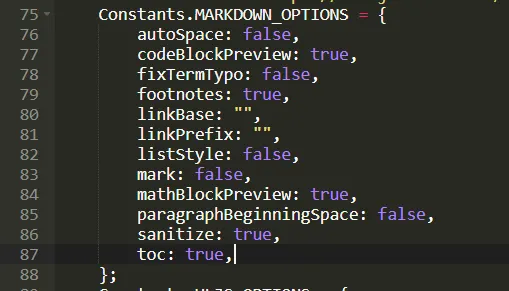
所有的这一切做完后,理论上前后台都能渲染toc目录了。当然,需要清除一下浏览器的页面缓存,使更改的js生效。
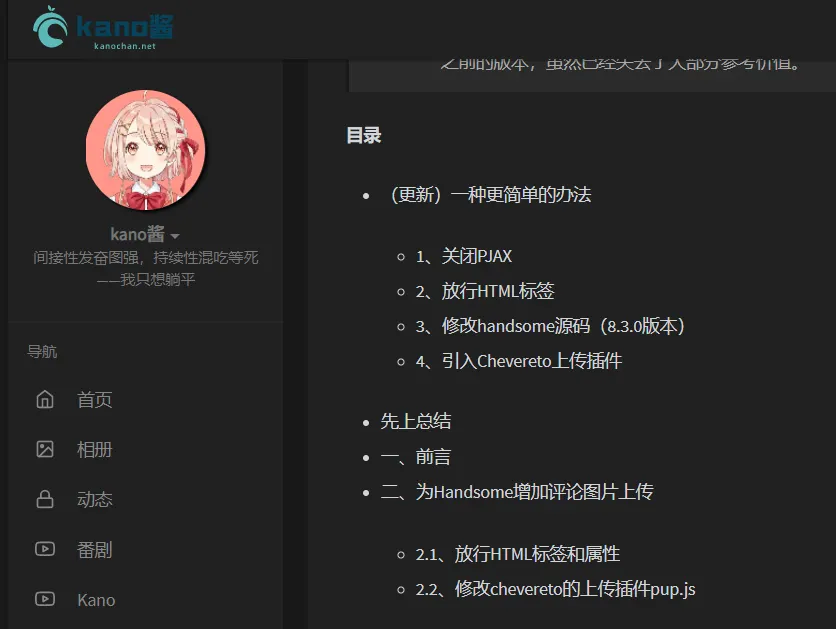
修改toc目录文字的颜色,便于与正文做出区分。添加自定义css代码:
/*toc目录文字颜色*/.vditor-toc { color: #337ab7;}/*toc目录文字颜色结束*/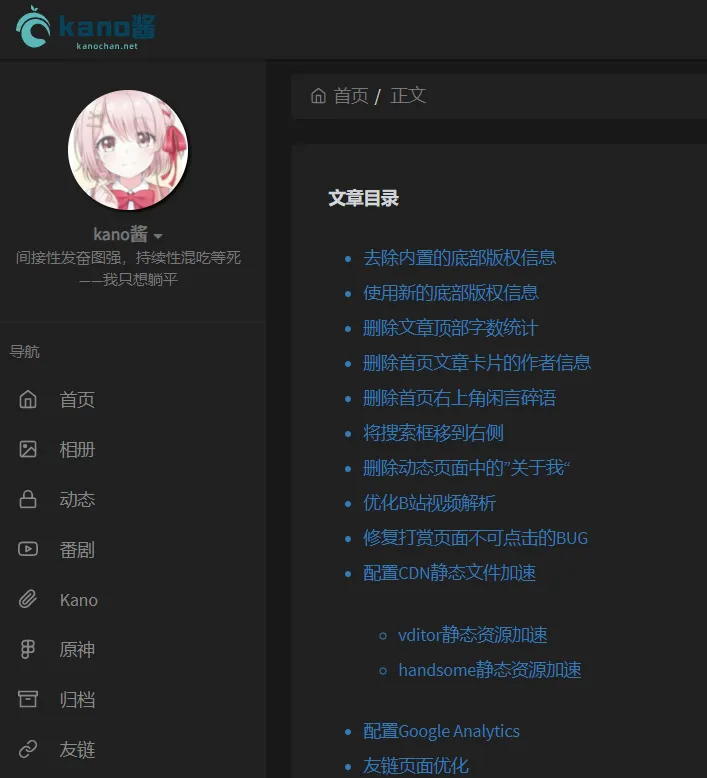
常用的一些脚本
老鬼VPS测试脚本
wget -qO- git.io/superbench.sh | bashLoc论坛BBR脚本
wget -N --no-check-certificate "https://github.000060000.xyz/tcpx.sh" && chmod +x tcpx.sh && ./tcpx.sh服务器回程测试
wget -qO- git.io/autobesttrace | bash文章分享
如果这篇文章对你有帮助,欢迎分享给更多人!